nPhoneKIT is a free, open-source toolbox designed for Android devices, mainly used for FRP bypass and other unlocking tasks. It stands out because it is transparent, community-driven, and avoids the hidden processes common in closed-source tools. This blog will explain what nPhoneKIT is, its features, requirements, supported devices, how to download and use it, troubleshooting tips, FAQs, and more.
In this blog, we will explore nPhoneKIT, an open-source tool created to help Android users with FRP bypass, unlocking, and other device management tasks. Unlike many closed-source tools, nPhoneKIT shows you exactly what commands are being executed, making it safer and more transparent. Here, you will learn what nPhoneKIT is, its features, requirements, supported devices, how to install it, and how to troubleshoot common issues.
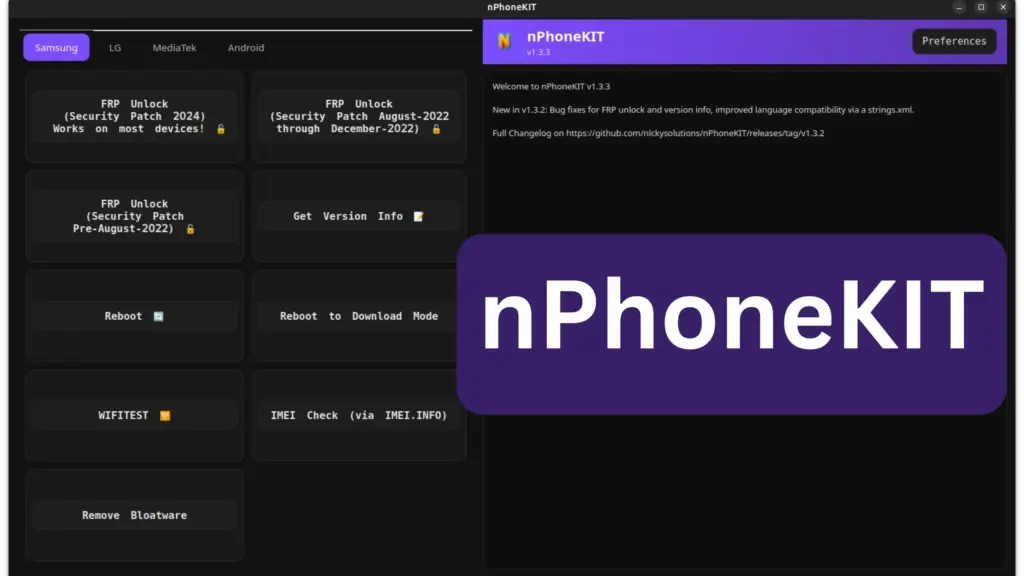
Table of Contents
What is nPhoneKIT?
nPhoneKIT is a fully open-source toolbox for Android devices. It was developed to replace closed-source unlocking tools that often hide their processes. Built in Python, it allows users to see the actual commands being run, ensuring transparency and trust. It is free, safe, and community-powered, with regular updates and bug fixes.
Key Features
- FRP Bypass for Samsung devices (including Android 15/16 support).
- Firmware and version info retrieval for Samsung phones.
- Reboot options (normal or download mode).
- Hidden WLANTEST menu access on Samsung devices.
- IMEI check via imei.info.
- Remove bloatware from devices.
- LG legacy screen unlock (pre-G5 models).
- MediaTek support via MTKCLIENT.
- Generic Android reboot functions.
Requirements
- Windows: Python 3.10, Pip, Zadig (WinUSB/libusb drivers), Samsung USB drivers.
- Linux (Debian/Arch): Python3, Tk, PySerial, Requests, PyQt5, ADB.
- Additional: Administrator or sudo access, internet connection for IMEI checks.
Supported Devices
- Samsung: Most U.S. 2024 models, devices with security patches from 2022 onward.
- LG: Legacy models (pre-G5).
- MediaTek-based phones: Supported via MTKCLIENT.
- Motorola: FRP unlock is experimental and may not work reliably.
Download
You can download nPhoneKIT directly from its GitHub releases page. Simply grab the Source Code (ZIP), extract it, and follow installation instructions for your operating system.
How to Use
- Install required drivers and dependencies.
- Extract the source code.
- Open Command Prompt (Windows) or Terminal (Linux).
- Navigate to the nPhoneKIT folder.
- Run:
- Windows: python main.py
- Linux: sudo python3 main.py
- Follow on-screen instructions to perform FRP bypass or other tasks.
Check this also: SamFw Tool
Troubleshooting
- Motorola FRP not working: This is a known issue; functionality is experimental.
- MTK features not loading on Linux: Ensure you set up the virtual environment and install MTKCLIENT requirements.
- Driver errors on Windows: Reinstall Zadig drivers and Samsung USB drivers.
- Permission issues: Always run as Administrator (Windows) or with sudo (Linux).
FAQs
Yes, it is open-source, meaning you can inspect the code yourself.
No, support is limited to Samsung, LG legacy, and MediaTek devices. Motorola support is experimental.
No, nPhoneKIT is completely free and does not include ads.
Legal Notes
nPhoneKIT does not distribute firmware or proprietary binaries. It uses standard public commands like ADB. It is not affiliated with Samsung, LG, or Google. It is meant for educational use and for owners of their own devices.
Conclusion
nPhoneKIT is a powerful, open-source alternative for Android FRP bypass and unlocking. It is transparent, free, and community-driven, making it a trustworthy choice compared to closed-source tools. While it has limitations (like Motorola support), it continues to evolve with regular updates. If you need a reliable FRP bypass tool, nPhoneKIT is worth trying.
UNLOCK GAlaxy A05 REMOVE FRP