Welcome to this complete guide on Lazy Loader! If you work with mobile phone servicing, software repairs, or unlocking devices, you have likely heard about this utility. Modern smartphones come with strong security measures, which means technicians need reliable tools to perform repairs, unlock accounts, and flash firmware safely.
In this blog post, you will learn everything you need to know about Lazy Loader. We will cover what the tool is, explore its primary features, list the system requirements, explain how to download and install it properly, provide a simple step-by-step guide on how to use it, discuss credits and troubleshooting tips, answer common questions, and wrap up with useful takeaways.
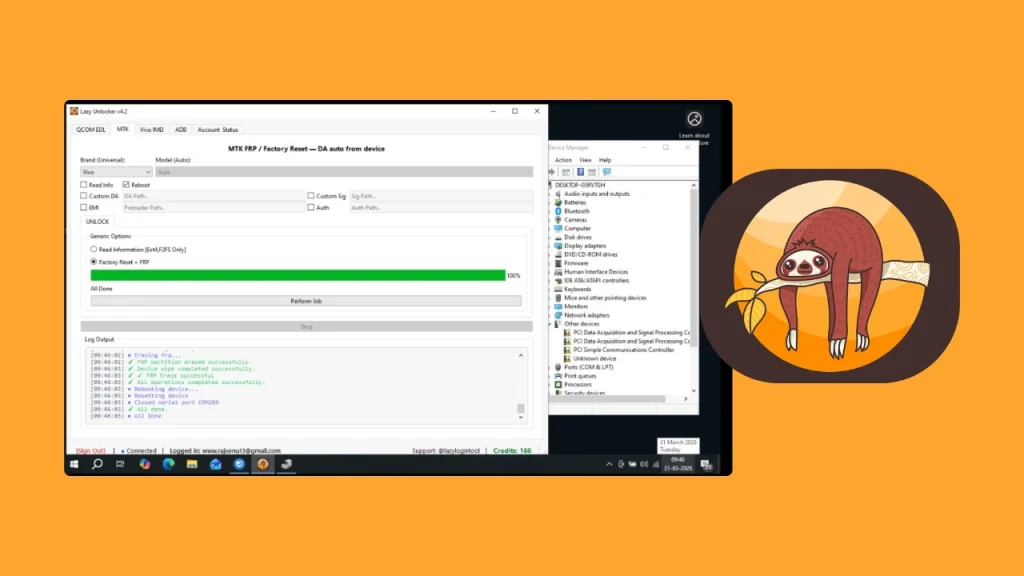
Table of Contents
What is Lazy Loader?
Lazy Loader, also known as Lazy Login Tool, is a specialized software program created for mobile phone repair technicians and service centers. It provides a simple and direct way to perform advanced software servicing operations on modern smartphones.
The tool is primary used to bypass Factory Reset Protection (FRP locks), remove account security, and flash stock firmware on mobile devices. It works across many popular smartphone brands, particularly those running on MediaTek (MTK) and Qualcomm (QCOM) chipsets. Instead of requiring complex manual procedures, Lazy Loader uses a cloud server authentication system that lets technicians process devices quickly through authorization keys or one-time passcodes.
Features of Lazy Loader
Lazy Loader comes with a variety of features designed to make mobile software servicing easier and faster for users. Here are the main features:
- One-Click FRP Bypass: Easily remove Google account locks and Factory Reset Protection on supported smartphone models.
- Multi-Chipset Support: Works smoothly with devices powered by Qualcomm and MediaTek processors.
- Firmware Flashing: Install stock firmware and system files to repair soft-bricked or stuck mobile devices.
- Cloud Server Authorization: Uses a secure online server connection to verify operations and authorization codes quickly.
- Live Service Status: Includes an internal status display so you can check whether the authorization server is online before starting a process.
- Clean User Interface: Features a simple, straightforward layout that does not require complicated setup steps.
- No Account Registration Needed: You do not need to fill out long registration forms inside the software to begin working.
Requirements
Before installing and using Lazy Loader on your computer, ensure your system meets the necessary hardware and software requirements:
- Operating System: Windows 7, Windows 8, Windows 10, or Windows 11 (both 32-bit and 64-bit systems supported).
- Processor & RAM: Intel or AMD processor with at least 2 GB of RAM (4 GB or higher recommended).
- Storage Space: At least 200 MB of free hard drive space for the tool and drivers.
- Internet Connection: Stable, high-speed internet connection to communicate with the online authorization server.
- Required Drivers: Qualcomm and MediaTek USB drivers installed on your computer.
- USB Cable: High-quality micro-USB or Type-C data cable.
- Archive Utility: WinRAR or 7-Zip installed on your system to extract compressed setup files.
Download
To get started with Lazy Loader, you need to obtain the installation files and driver packages. The setup package is distributed as a compressed ZIP file to keep file sizes manageable.
When downloading the package, make sure to also acquire the combined Qualcomm and MediaTek driver archive, often named QcomMTK Driver. Keep in mind that the compressed setup file is protected with an extraction password. The standard password to extract the ZIP archive is 1122.
Save both the main tool setup file and the driver package to a clear folder on your desktop so you can find them easily during installation.
How to Install
Installing Lazy Loader on a Windows computer is simple when following these steps:
- Locate the downloaded ZIP file on your computer.
- Right-click the archive file and choose to extract it using WinRAR or 7-Zip.
- When prompted for a password, enter 1122 and click OK.
- Open the extracted driver folder and run the driver setup file to install the required Qualcomm and MediaTek drivers on your PC. Restart your computer if prompted.
- Open the extracted Lazy Loader folder and locate the main executable application file.
- Right-click the application file and select “Run as Administrator” to launch or install the application.
- Follow the on-screen prompts to complete the setup process.
How to Use
Using Lazy Loader to service a phone involves a straightforward process. Here is how to complete a typical servicing task:
- Launch the Lazy Loader program on your Windows PC as an administrator.
- Check the built-in server status indicator inside the tool to ensure the service status is active and online.
- Select the appropriate operation you want to perform, such as FRP unlock or firmware flashing.
- Select the target phone brand and chipset type from the available options.
- Enter your fresh One-Time Password (OTP) or authentication code into the required field when requested.
- Power off your target mobile device and connect it to your PC in the correct mode, such as EDL mode for Qualcomm devices or MTK USB mode for MediaTek devices.
- Click the Start or Execute button inside the program.
- Wait patiently while the tool communicates with the server and completes the servicing process. Do not disconnect the phone until the tool displays a success message.
Credits
Lazy Loader relies on an online authorization network to handle secure security checks. While downloading the basic executable file is free, running specific repair or unlocking actions requires server credits or one-time authorization tokens (OTP).
These credits or OTP codes are purchased through servicing partners and authorized distributors. Credit system usage ensures that server infrastructure remains fast, updated, and maintained. Special recognition goes to the developer team behind Lazy Loader for creating a reliable utility that simplifies device servicing for repair technicians worldwide.
Troubleshooting
If you encounter errors while using Lazy Loader, try these common troubleshooting steps:
- Phone Not Recognized: If the tool fails to detect your phone, re-install the Qualcomm and MediaTek drivers. Try using a different USB port or a higher-quality USB cable.
- Server Status Offline: If the tool indicates the service status is OFF, do not attempt to start a process. Wait until the server maintenance finishes and status returns to ON.
- Invalid OTP Error: OTP codes are time-sensitive and single-use. Make sure you enter a newly generated code right after obtaining it without extra spaces.
- Extraction Errors: If you receive an error while opening the ZIP file, double-check that you entered the correct password, 1122, and ensure your extraction software is up to date.
- Antivirus Warnings: Security software might occasionally flag servicing tools as false positives. If the program gets blocked, temporarily pause your antivirus program or add the tool folder to your antivirus exclusion list.
Disclaimer
This blog post is for educational purposes only. Bypassing FRP may void your warranty and is intended for use on devices you own or have permission to modify. Use this tool responsibly.
FAQs
The password to extract the ZIP package is 1122.
No, Lazy Loader requires an active internet connection to verify authorization through its cloud server before executing operations.
No hardware box or dongle is required. Lazy Loader operates as a digital software tool using server credits and authorization passcodes.
While Lazy Loader supports a wide selection of Qualcomm and MediaTek devices, support depends on specific models and firmware builds. Always check the supported model list before attempting a repair.
Make sure you are using the correct key combinations for your specific device model to enter EDL or MTK mode, and verify that your USB drivers are properly installed in Windows Device Manager.
Conclusion
Lazy Loader is a practical tool for mobile technicians who need a fast, server-backed solution for FRP unlocking, firmware flashing, and software repairs. By following the proper installation steps, keeping your USB drivers updated, and ensuring a stable internet connection, you can streamline your mobile repair tasks effectively.
We hope this full guide answered all your questions about Lazy Loader. Have you tried using this software for mobile servicing? If you ran into any issues or have additional tips to share, please leave a comment below!